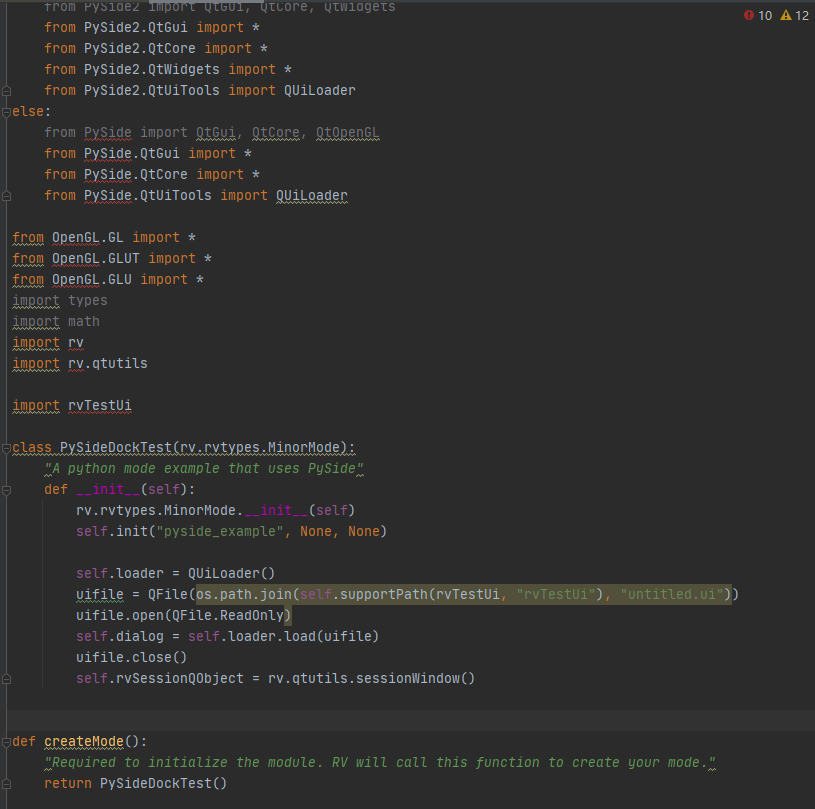
I’m very sorry, maybe the question of this post is very basic, but it may be very important for me. I learned from the official examples,And replace part of the content.Cannot run after packaging.It s None return any Error, Code:
Have a simpler and more intuitive example to let me know the calling process?THANK! 
Hey,
can you maybe provide the packed file, so that testing and checking the code is easier than by checking a screenshot.
There may be an error with your import rvTestUi. I guess it is something you wrote? (If you can provide code please include this too, if this is done by you.)
I see your uifile is underlined, which may indicate an error.
Also wildcard imports (from PACKAGE import *) are never a good idead. It leaves your code really messy and hard to debug. Rather do from PySide import QtCore and reference QtCore.QFile() or do it like you did with the QUiLoader.
rvTestUi-1.0.rvpkg (3.2 KB)
THANK!So I know a lot, this is the source file, hope you have time to analyze it
So I went through your code.
First off, you initialised the wrong package.
self.init("pyside_example", None, None)
you want rvTestUi in there. I’m not sure how that influences your package itself. It just throws an error for me, if I want to load the pyside_example package too.
Other than that your code is fine, it’s just not finished.
For your dialog to do something it needs to be shown.
The pyside_example has activate and deactivate methods for that.
def activate(self):
    rv.rvtypes.MinorMode.activate(self)
    self.dialog.show()
If you add them to your code, the dialog pops up right away.
And I really would change the imports if you continue to add to your code. It will be so much easier to debug and so much cleaner.