Article written by @sergio.leon
covering Webhooksand the Event framework
Table of contents
- Automations: reacting to events
- Events on the FPTr web UI
- Event entity and how to query them
- Triggering events
- Webhooks vs. Event Framework
- Choosing the right architecture
- Comparative on events to catch
- Where to find more ADN articles
- …
Many actions in Flow Production Tracking generate an internal event. All these events are logged. How can we make practical use of them? How do I get notified? How can we react to those events to automate tasks? What type of events do I have access to and how? Can I define my own ones?. These are some of the questions we will try to clarify in this article.
Automations: reacting to events
Reacting to events is a common approach used for automations. There are many workflows and use cases we could implement. Some samples are:

Events on the FPTr web UI
Events that have been registered in Flow Production Tracking (FPTr) can be listed on your site by checking the ‘Event Log Entry List’ from the default layouts.
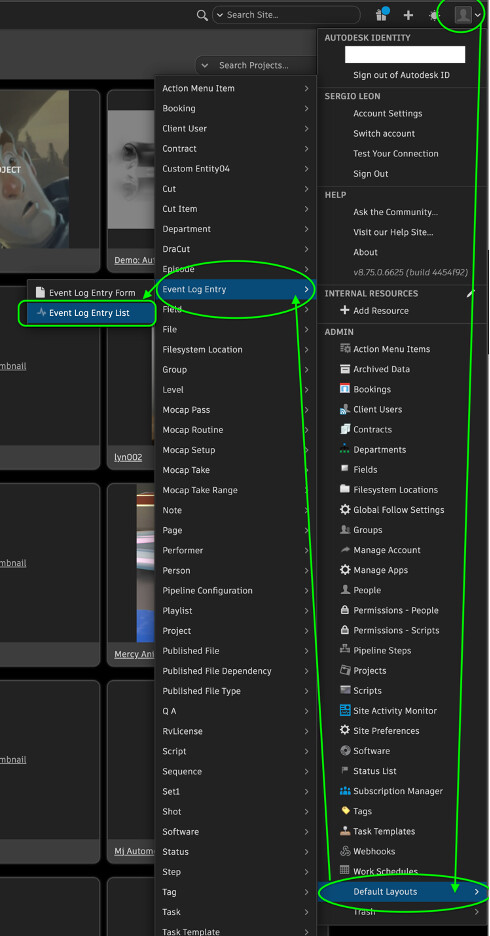
Events are listed with their fields. Remember the list is paginated. On the right down corner you can set the list limit and browse throw the pages. The events fields will help us to understand in which context and from which tool were triggered. We will see they have the following fields or attributes:
- Identifier,
- event summary, should describe the event,
- event type, a name that follows a specific format, ‘Tool_EntityType_Operation’. For example, the events that you may find coming from FPTr respect the following form Shotgun_[entity_type]_[New|Change|Retirement|Revival].
- who triggered it, it does not have to be a person, could be a script or agent
- date and hour, indicating when the event was triggered,
- Project, indicating us this context
- a link, to an entity, that also defines in which context and which maybe an entity was affected,
- metadata, where even more information can be stored, more related to the operation and the changes it caused, like a new entity, or a change of values of a field. The structure is specific to the event itself.
- a thumbnail
While listing them on the web, you can filter them using the values on their fields. Consider, many may be empty, as there is no enforcement on them when they are triggered. More information about the web view can be found in:
Due to the current data retention policy, you can only see events from the last 6 months. After that period, you can still extract the events not visible anymore from the database, that have been archived on external storage for up to 5 years. Archived events are downloadable through the Flow Production Tracking Web Application by selecting the Archived Data option in the admin menu. You can find more info in the Security White Paper.

Event entity and how to query them
Events are an Entity in FPTr. Remember that data in FPTr is organized into entities, somewhat similar to tables in a database. Entities have fields, also called attributes, and there are relations to establish between entities.
An event is of the type ‘EventLogEntry’. Let’s say you are interested in exporting the history of events. In that case, you can use a script using the Python API to export all the entities of that type into an csv. This way, for example, a Coordinator could use this data further. You could filter events directly on the script itself or further down the workflow.

Note that the entity field (with fields ‘entity.id’, ‘entity.name’ and ‘entity.type’) is the entity linked to the event. If the event implies a change in a Shot, this will be the entity linked to the event. An event could be linked to a ‘Task’, a ‘Sequence, an ‘Attachment’, a ‘Version, ’an ‘HumanUser’, an ‘ApiUser’, an ‘ActionMenuItem’, … etc. We can use the linked entity field type to filter or get more information about the context if necessary. The script above is quite simple, feel free to customize to your needs!
You could the script we saw before, that exports the events using an Action Item Menu (AIM). This way, anyone on the studio could export the events related to an entity, or all of them directly from the web UI.
Triggering events
In case you develop your own application, engine or framework; or you need to make use of events for a specific process, you can create them. In case you are developing your own application, please follow the steps on this link:
One application that registers a command to trigger an event will look like this:
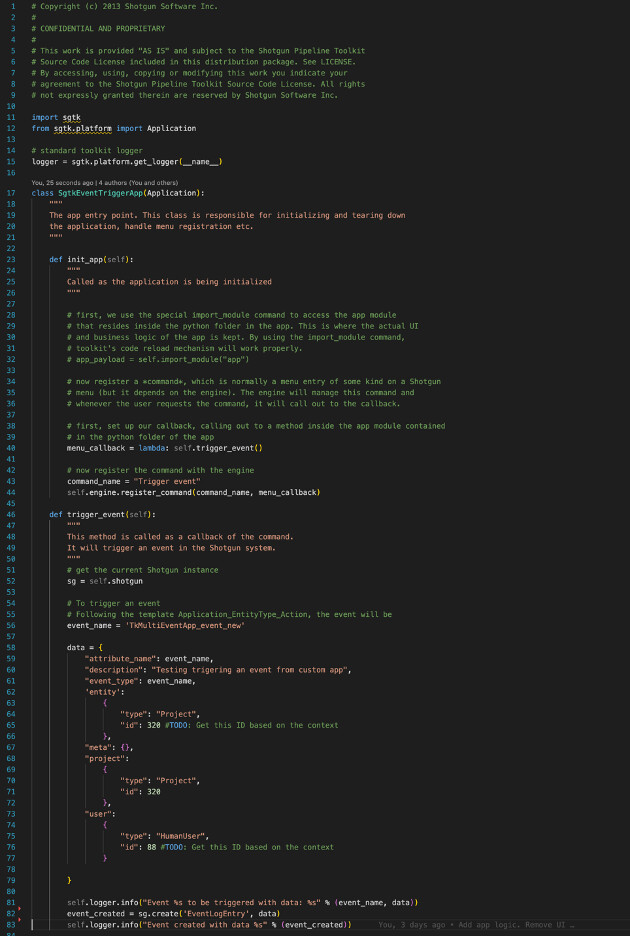
Note that the event that is being triggered is of the type ‘tkMultiEventApp_event_new’ following the format mentioned before. Some fields like the data and the user who creates it are automatically filled out by FPTR.

For listening to events and setup an automatic action, we can make use of two different technologies with their own approach and specifics: Webhooks and the Event framework, this last one also called as ‘Event Daemon’ on many resources. What is the difference between these both approaches?
FPTR webhooks use standard web technology to notify events using web standard technology. Webhooks are a powerful tool in modern web development, enabling real-time data communication and integration between disparate systems. Essentially, we define callbacks that are going to be triggered with specific events. When an event occurs in the source site, a webhook makes an HTTP request to the URL specified by the user, usually to a web application that handles the event information. Webhooks use standard HTTP methods and status codes. Typically, the POST method is used to send data to the receiving server.
On the other hand, we have the Event framework. It is a python service running on a machine, a service that will monitor the events in Flow PT. It will allow us to add plugins where we define the actions to take using the FPTR python API.
-
Documentation: https://help.autodesk.com/view/SGDEV/ENU/?guid=SGD_Event_Driven_Triggers_Event_Framework_html
-
GitHub Repo: https://github.com/shotgunsoftware/shotgunEvents
-
GitHub doc: https://github.com/shotgunsoftware/shotgunEvents/wiki
Here is a comparison to help in choosing the right architecture:
| Category | Webhooks | Event Framework |
|---|---|---|
| Technology | Using web standard approach. It can be written in any programming language that supports HTTP; most do. | Python daemon service running on a machine with access to the Flow Production Tracking (FPTR) instance. |
| Language / Openness | Send notifications that can be consumed from any programming language. | Developed in Python. Code is open-source. |
| Cloud Readiness | Can be used from cloud-enabled solutions. | Requires internal setup on a machine with access to the FPTR instance; needs maintenance. |
| Infrastructure Requirements | Requires a web client that receives the callback call. Can be any automation tool: Zapier, IFTTT, AWS Lambda, Microsoft Power Automate, Node-Red, Postman Flows, Workato, etc. | One single framework monitors all events and scripts that launch a process. Centralized in one place. |
| Usage Scope | Observe a few types of events: mainly entity lifecycle events and several global events. You can filter by project. | Gets every event in the Event Log Page and Toolkit events. Requires filtering afterward. Entity lifecycle events included. |
| Management | Managed by Autodesk — it is provided to customers. | Has to be maintained. |
| Testing | For testing, webhook.site, ngrok, etc. can be used. | You can try the configuration; a suite of script samples is available. |
| Event Registration | Need to register for the event(s) of interest. FPTR sends an HTTP POST to your webhook callback URL; client app consumes and responds. | The process parses all events; filtering must occur in the plugin. |
| Triggering Actions | When using cloud automation services, it uses the RESTful API to trigger actions. | When using FPTR Event Framework, you mainly use the Python API to trigger actions. |
| Delivery Guarantee | If a webhook request fails, retry mechanisms or logging can be implemented. Without retries, requests may be lost if the receiving server is down. | System does not guarantee 100% event delivery. Restarting all deliveries from a specific event ID is possible. |
| Security | Can use token-based authentication, IP whitelisting, SSL/TLS for secure transmission. | — |
| Failed Delivery Recovery | Allows up to 100 failed deliveries in the past 24 hours. | — |
For simple tasks, I would say webhooks are preferred over the Event framework. It is easier to setup for the first time, and because it is more an open solution, it is easier to use with external tools for integration purposes. The Event framework requires setting it up in a machine with access to FPTR instance and IT maintenance.
If you are still unsure what is better based on their features, here is another way to decided, based on your skills:
| User Profile | Recommended Option |
|---|---|
| Developer with web development knowledge on using notifications to automate tasks in a cloud environment | Webhooks |
| Developer with Python knowledge and no web skills who wants to automate tasks from a single machine | Event Framework |
| Non-developer (Artist, Supervisor, Coordinator, …) using an online platform to automate tasks with no-code/low-code tools | Webhooks |
Comparative on events to catch
Webhooks is limited and can only observe the following events. The first types are the Entity lifecycle events, when an entity is
- created ,
- updated
- deleted (move to trash)
- revived (move back from trash)
The Entity options for Entity Lifecycle Events are limited to those that are available via API calls, and exclude API Users, connection entities and Event Log Entries. Connection entities are used by Flow Production Tracking internally to create relationships between entities. Connection Entities typically include the prefix ‘Connection’ in their name.
The second type of events webhooks can catch are the ones on this list:
They are related to:
- User logins
- Rv Session
- AIM (Action Menu Item)
- CRS
- PAT
- CutSupportDataMigration
- Operations in other Webhooks
If it is not listed there, and it is not related to an operation in an entity, as mentioned before, then it is most probably not supported yet.
On the other side, the Event Framework gets every event in ‘Event Log Page’, including some Toolkit events. The entity life cycle events are included. Event Framework covers all events from:
Note that unfortunately there is a bit of inconsistency on the naming for the Lifecycle operation name:
- Webhooks: created, updated, deleted, revived
- Event Log Entry (caught by Event Framework): New, Change, Retirement, Revival
- Shotgun_[entity_type]_[New|Change|Retirement|Revival]
More info in:
Where to find more ADN articles
We are tagging our articles with adn-articles so they are easy to filter in the community forum. They cover API-related topics designed to help you apply Flow Production Tracking and Autodesk Platform Services APIs more effectively in real production workflows with common workflow implementations, troubleshooting guides and research insights.
There you will find the second part of this guide: Events in Flow Production Tracking - Part 2 (ADN Article)
We hope these resources become valuable to you. Stay tuned!